GAIM HUNTING Shooting Simulator
GAIM Hunting includes the GAIM Wooden Rifle and 6 hunting scenarios, making it the ideal starter pack for novice virtual reality hunters and sport shooters.
The perfect tool to improve your shooting
GAIM Hunting is the starter software package for any hunter who wants to practice or enjoy a virtual reality driven hunt or bird shooting anywhere you are. The GAIM Hunting package includes software, the GAIM Wooden Rifle and the Trigger Gen 2. * GAIM is currently compatible with Meta Quest 2, Quest 3 and Quest Pro.
Click on the picture to see the full video:
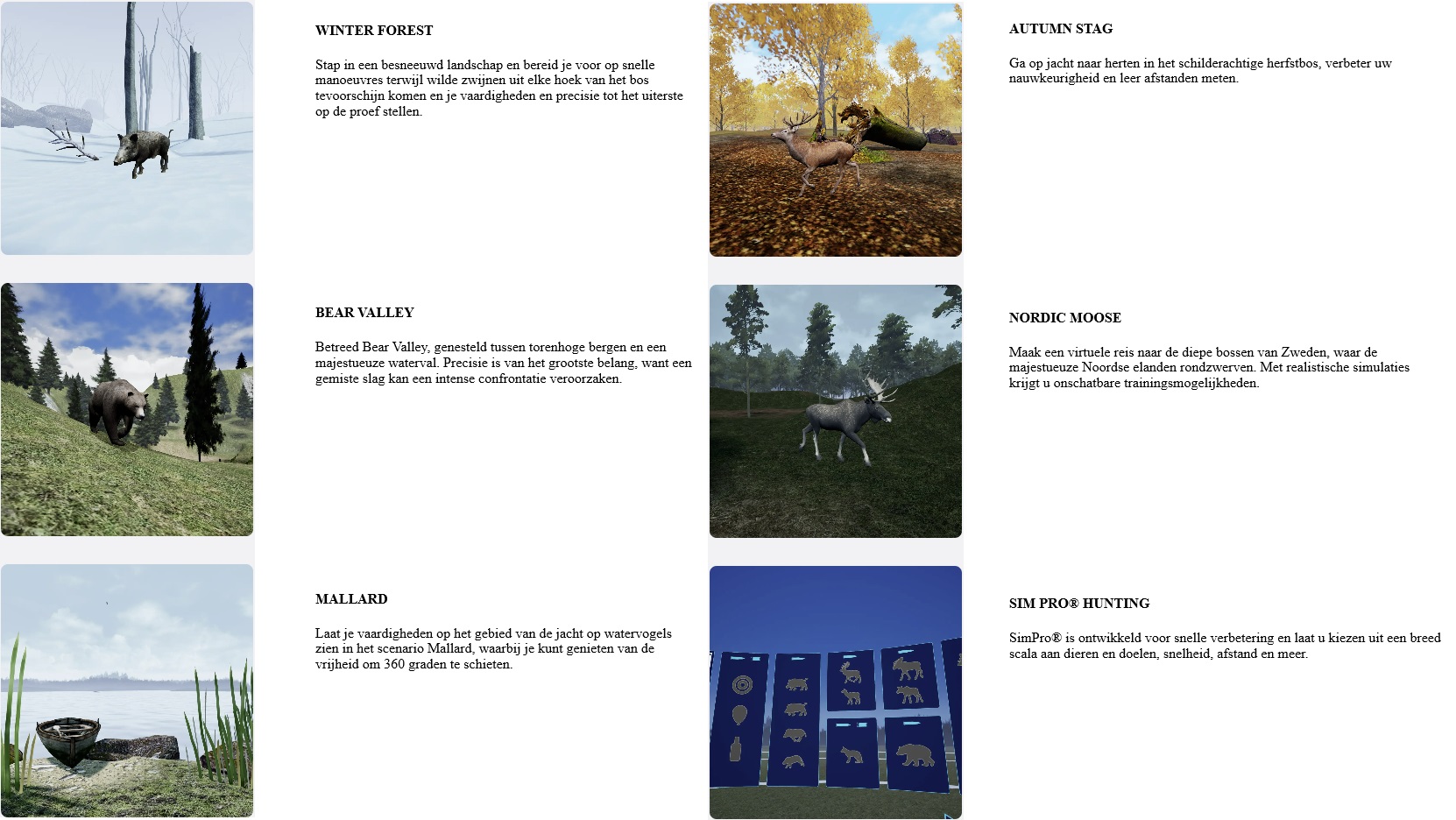
Included scenarios.
Let us guide you with your GAIM!
Videogidsen
Visit our help desk and be sure to watch all our guide videos to ensure you get the right connection and configuration. We want to share some tips with you to make your shooting experience the best it can be.
Player Profile
When you first start GAIM, we recommend creating a player for you and others who plan to use the system. Enter your initials and remember to choose a player before you shoot. That way, the highest score, medals, statistics and firearm settings will be saved correctly for each user.
Firearm setup
Then proceed to the firearm setup. For quick setup, the four straight arrows under and over the rifle align the red dot and rifle. Adjust the size of the red dot and you're ready to go. See our video guide for more details.
Analyze and improve
After each round, you can press the magnifying glass icon to see each shot with barrel tracking in replay. A good setup we can suggest is to press the mountain icon in the bottom left corner and select all shots to see and analyze your shot.
Klantenondersteuning
If you have any questions, please do not hesitate to contact us.
Bas Schuiten by phone +31 (0)6 11 38 07 97 or by mail: info@jachtenoutdoor.nl
Are you better than the global average?
Statistics of total number of shots and time spent:
You can now see the total number of shots fired, scenarios played and time spent on our various firearms. This detailed tracking helps you understand your usage patterns and gives you the right to brag about the total number of shots fired.
Benchmark performance graphs:
Visualize your progress with our new performance graphs! Compare your performance to the global average, top 10% and top 1% of GAIM users. This feature provides valuable insights into where you stand and how to improve different scenarios.
Scenario-based analysis:
Dive deeper into your performance with detailed statistics across different scenarios. View the percentage of shots that resulted in kills, injuries and misses. This breakdown helps you identify areas of improvement and refine your shooting techniques.
Setting profiles for all users:
Be sure to set up and use profiles within GAIM. Not only for proper setup of firearms, but also because these stats are linked to the profiles in your license key.
Create a free myGAIM account today
To get the full experience out of your simulator, we highly recommend creating a free account on our customer portal my.gaim.com. It gives you access to your license key, your shooting activity and medals. And there's more to come! Creating your account takes one minute. If you haven't created a myGAIM account. Here's what you need to do today:
1) Go to my.gaim.com and create your account using the email associated with your existing GAIM license key.
Please make sure it is a valid email as we will ask for confirmation.
If you are not sure which email address your license key is linked to, please contact us here.
2) Personalize your experience by entering your details and preferences, including the option to customize the name of your license key.
When you purchase a scenario or simulator from us, you will receive an activation code. No license key. Enter the activation code in myGAIM to access your purchased product. If it is a new simulator, you will receive a new license key. For additional scenarios, choose the license key to which it should be added.